
Updated: 27 October 2026 la 00:12. Articolul a fost revizuit pentru a reflecta informațiile disponibile la această dată.
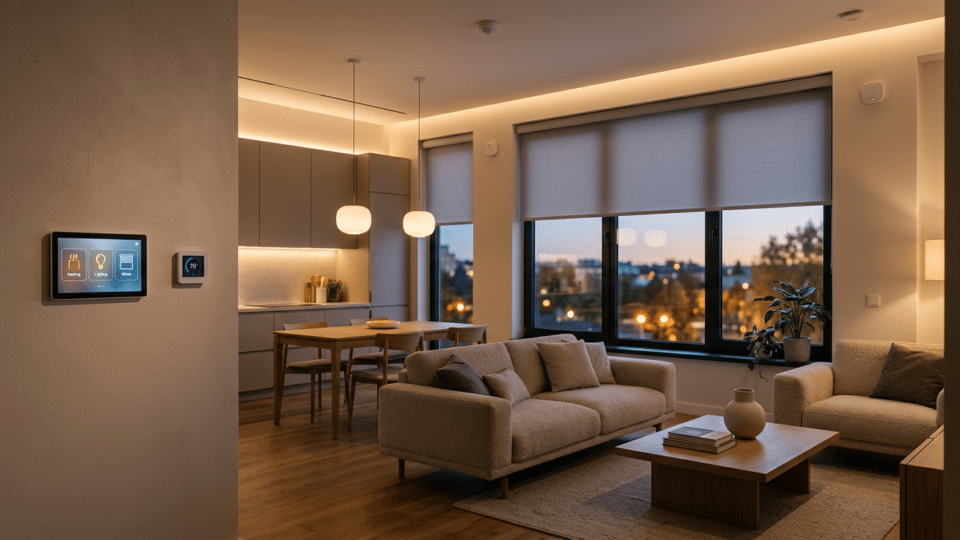
A smart home does not have to begin with an expensive system installed throughout the walls. In many flats, the most useful results come from a few well-chosen automations: low-level night lighting, careful temperature control, water-leak warnings and a simple “Away” button. But not every connected plug lowers the bill, and a cheap device can become costly if it is incompatible or receives security updates only rarely.
We selected 15 practical automations for comfort, security and savings, explaining what equipment is needed, when each is worthwhile and what can go wrong. The technical information refers to the Matter 1.6 standard, announced in June 2026 by the Connectivity Standards Alliance, and to NIST recommendations on connected-device security. We do not promise savings of 20–40% without measurements in a specific home.
InfoBuz — research as of 26 October 2026. Prices and compatibility should be checked individually before purchase. Work on 230 V electrical installations, gas, water or protective equipment must be carried out only by competent and, where required, authorised personnel.
How to build a smart home without buying unnecessary gadgets
Start with a real problem, not a brand. If bright light bothers you at night, a sensor-controlled bulb is more useful than a surveillance camera in the living room. If you want lower bills, first measure consumption and identify what can safely be controlled. The right sequence is problem → measurement → compatibility → automation → checking the result.
| Technology | Role | Practical limitation |
|---|---|---|
| Wi-Fi | Connects many gadgets directly to the router | Too many devices or a weak signal can affect stability |
| Zigbee | Mesh network for compatible sensors and bulbs | Often requires a hub; compatibility may depend on the manufacturer |
| Thread | Efficient mesh network for IP devices | Requires a border router to communicate with the rest of the network |
| Matter | Interoperability standard between ecosystems | The version of the standard does not guarantee every function on every platform |
The official Matter 1.6 announcement of 17 June 2026 presents NFC setup, shared management through Joint Fabric and contextual suggestions for thermostats. These capabilities become genuinely available only when manufacturers and platforms implement the update. For a detailed explanation of compatibility limits, see InfoBuz’s analysis of Matter 1.6.
15 smart-home automations, explained step by step
1. Hallway night light
What you need: a motion sensor and a smart bulb. Set it to switch on at 10–20% warm brightness when movement is detected during selected hours, then turn off after 60–90 seconds. It is useful on the route between bedroom and bathroom, causing less disruption at night than switching on the ceiling light. Make sure the light does not go off before the room can be crossed safely. For children and older people, testing in real conditions is essential.
2. Lights off when leaving home
What you need: a compatible plug or switch, plus presence detection. You can set up an “Away” scene that turns off decorative lighting once no presence is detected, with a manual override button. Avoid cutting power to security circuits, the refrigerator, medical equipment or heating systems that require continuous operation. The automation should apply only to suitable loads, not to a whole-home shutdown.
3. Lower temperature when the home is empty
What you need: a compatible thermostat and occupancy schedule. A moderate heating schedule can prevent overconsumption while the home is empty. With underfloor heating and some heat pumps, large reductions followed by rapid recovery can be counterproductive. Adjust the difference according to the system’s thermal inertia, outdoor temperature and residents’ needs. Do not assume that a thermostat saves a fixed percentage in every flat.
4. Air conditioning ready before you arrive
What you need: an appliance with compatible controls and optional geolocation. You can start cooling close to the expected return time, but only after checking consumption and conditions in the home. For many homes, a simple schedule works better than continuous location tracking. Enable temperature limits, automatic shut-off and an override option. Do not allow an incorrect command to start heating and cooling at the same time.
5. Water-leak notification
What you need: a water sensor near the washing machine or sink. A sensor placed at floor level can send an alert when it detects water. Automatically shutting off the supply requires a suitable valve, installed and checked by a specialist. Do not install unapproved devices on the main system. Test the notification and battery life; an alarm does not replace checking hoses and joints.
6. Alert for an open window when it rains
What you need: a magnetic contact sensor and a weather sensor or forecast. When rain begins, the automation can warn that the balcony window is open. If you use only an online forecast, it may be inaccurate locally; a physical weather station may improve relevance. Do not automate the closing of motorised windows without obstacle protection and confirmation of safety from the manufacturer.
7. Ventilation after a shower
What you need: a humidity sensor and compatible fan. When relative humidity rises above the bathroom’s usual level, the fan can run for a preset period. Adjust the thresholds to avoid repeated starts. Ventilation must use equipment suitable for a damp room and be installed by an authorised installer. A sensor does not fix water infiltration or replace appropriate electrical protection.
8. Blind control based on sunlight
What you need: a blind or shutter motor and brightness/temperature sensing. In a room exposed to afternoon sun, blinds can reduce solar gains and discomfort. Set intermediate positions, rather than only “open” and “closed”, and account for wind with outdoor systems. Materials and window orientation affect the result. Every automation should allow immediate manual control.
For further information, see The ideal temperature at home in winter: 18, 20 or 22°C?, which explores an aspect directly related to this subject.
9. Monitoring a high-consumption outlet
What you need: a correctly rated energy-monitoring plug. Measuring an appliance for a week shows consumption, not merely instantaneous power. Before buying, check maximum power, amperage and load type; do not connect heaters or appliances with heavy start-up loads beyond the device’s limits. The useful comparison is in kWh and the contractual price per kWh, not only the percentage displayed by the app.
10. Switching off a decorative charger when it is not in use
What you need: a smart plug for compatible appliances. A schedule can switch off a non-essential appliance, but the saving may be negligible if standby consumption is already very low. Calculate the saving in kWh before buying a plug for that purpose alone; the smart device itself also uses electricity. Do not cut power to equipment that needs to complete cycles or firmware updates.
11. A reasonable presence simulation while on holiday
What you need: lighting scenes with variable schedules. You can turn on a few lights at different times without creating the same daily pattern. This is a modest addition to security measures, not a substitute for locks, an alarm or contact with neighbours. Do not post on social media that the home is empty, and do not connect scenes that could create a fire risk.
12. Alert for an unusually open door
What you need: a contact sensor and time-based rules. For a storage room, garage or front door, a notification can flag an unusual opening. The configuration must distinguish authorised users from false alarms, including children arriving home. Keep a clear verification procedure before calling emergency services; a notification alone does not prove an intrusion.
13. Button for an “Evening” scene
What you need: a physical smart button and compatible bulbs/thermostat. A single button can dim lights, activate silent mode for compatible notifications and adjust the thermostat. Its benefit is ergonomics, not guaranteed savings. Choose simple logic that everyone in the home can understand. A conventional switch should remain usable if the platform fails.
14. Reminder for filters and consumables
What you need: a local calendar and notifications. An app can periodically remind you to clean air-conditioner filters, check the smoke detector and replace recommended consumables. Record the date of the last service rather than automatically using a universal interval. The correct schedule depends on the equipment and the manufacturer’s instructions. The smoke detector must be certified as a safety product, not improvised from generic sensors.
15. Local control when the internet goes down
What you need: a hub compatible with local automations. Choose devices and a controller that can carry out at least essential functions without a cloud connection. Test actions with the internet switched off and the local network available. Zigbee, Thread and Matter do not automatically mean complete independence from every online service: the app, authentication or some integrations may still depend on the cloud.
How much does a smart home cost? Three indicative budgets
| Level | Purpose | What to check first |
|---|---|---|
| Minimal | 1–2 bulbs, one sensor, one button | That the products can be used without a mandatory subscription |
| Intermediate | Hub, water and contact sensors, temperature control, scenes | Compatibility, battery costs, local rules |
| Extended | Zone-based thermal control, shading, consumption monitoring | Professional installation, warranties, security and maintenance |
We do not give a “guaranteed total price” because a bulb, a boiler thermostat and a blind actuator have very different costs and installation requirements. Professional wired equipment and wireless products also use different approaches. In an occupied flat, gradual installation while retaining manual controls may be more practical than replacing every system.
Real savings: how to measure whether an automation is worthwhile
Calculate savings from the energy actually avoided: kWh avoided × full price per kWh. For example, if an automation genuinely reduced consumption by 12 kWh in one month and the hypothetical total energy price were 1.20 lei/kWh, the saving would be 14.40 lei. The devices’ own consumption must be deducted and the upfront cost included. This is not an estimate of savings in Romania, but a mathematical illustration.
The U.S. Department of Energy says properly set thermostat schedules can reduce energy use in certain systems, but results depend on the local climate, insulation, occupancy and type of installation. In systems with high thermal inertia, frequent and aggressive changes can be inefficient. See its guide to programmable thermostats.
Connected-home security: seven rules that matter
- Use unique passwords for device accounts and multifactor authentication where available.
- Automatically update device and router software; do not keep products in service once they no longer receive security support.
- Separate IoT gadgets from the laptop that holds important documents, using a guest network or VLAN where possible.
- Check access to the microphone, camera, location and data stored in the cloud.
- Keep switches and local controls usable if the internet connection or online account stops working.
- Test water sensors, alarms and batteries regularly; an ignored notification provides no protection.
- Do not replace certified smoke or carbon-monoxide detectors with unapproved DIY gadgets.
NIST explicitly recommends automatic updates and network segmentation. A home that can be controlled over the internet should also be treated as digital infrastructure. Sometimes the best upgrade is a secure router or a simple recovery procedure after an outage, not another gadget with coloured lights.
Frequently asked questions about smart-home automations
Do I need a hub for every device?
Not necessarily. Some devices connect directly through Wi-Fi, while other ecosystems require a hub or border router. What matters is actual interoperability for the model and software version you use.
Does Matter 1.6 guarantee that products work everywhere?
No. It is a specification that companies implement at different speeds. Explicitly check the functions you want in your app and hub.
Is a smart plug worthwhile just to save energy?
Only if measurement shows consumption high enough for the savings to justify the plug’s cost and the energy it uses. For appliances with very low standby consumption, payback may be slow.
Can I safely automate my boiler or water supply?
Only with compatible devices and installation in line with the manufacturer’s instructions. Do not improvise electrical connections or controls for critical systems.
Conclusion: good automations fade into the background
A successful smart home is one in which technology quietly solves real problems. Comfort, savings and security can be improved through simple scenarios, but each should be measured, tested and kept under the resident’s control. Start with two or three functions, check them for a month, and expand the system only if the result justifies the investment.





Discuția cititorilor
Ai o opinie sau o întrebare despre acest articol? Spune-ne ce crezi.
Fii primul care deschide discuția.
Te rugăm să păstrezi un limbaj civilizat și să discuți la subiect. Comentariile spam sunt filtrate automat.