
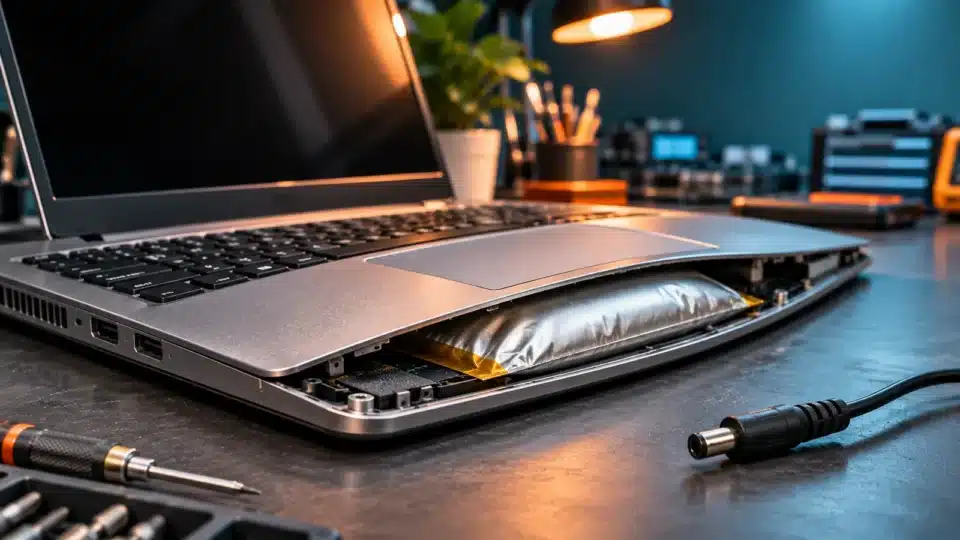
A swollen laptop battery is not a cosmetic defect. If the touchpad is lifting, the case is deforming or the bottom cover no longer closes properly, the lithium-ion battery may have an internal problem that requires the laptop to be taken out of use and professionally assessed. Under certain conditions, a damaged battery can release gases, overheat or enter thermal runaway — uncontrolled heating that can create a fire risk.
The most important advice is this: turn off the laptop, disconnect the charger if you can do so safely, do not press on the battery, and do not try to puncture or flatten it. If there is smoke, flames, hissing, a strong unusual smell or excessive heat, move away, evacuate the area and call 112. Do not handle a device that is smoking or burning.
This InfoBuz guide draws on safety recommendations from manufacturers and public bodies, including Dell — Swollen Battery Information and Guidance, US EPA — Used Lithium-Ion Batteries and London Fire Brigade — Batteries and Chargers. It distinguishes between laptops that are merely deformed and those showing signs of immediate danger.
How to recognise a swollen laptop battery
In many modern laptops, the battery is a flat pack of lithium-ion or lithium-polymer cells installed beneath the keyboard and touchpad area. When some cells swell, the pressure can push the case outwards from within. You do not need to open the device to spot certain signs.
- The touchpad sits above the surrounding case, is unevenly pressed or no longer clicks normally.
- The keyboard, palm rest or bottom cover is bulging.
- A new gap appears between parts of the case, or screws appear to be under tension.
- The laptop no longer sits flat on a level surface, even though it did previously.
- The lid or underside is deforming without an obvious impact.
- Unusual heating, odours, shorter battery life or shutdowns may occur, but are not essential signs.
A deformed case can have other causes, such as impact damage or damaged mechanical parts. Until it has been checked by a repair service, however, swelling around the battery should be treated as a possible battery problem, not as a defect that can be fixed by pressing it down.
What to do immediately: a safety protocol based on symptoms
| What you observe | Recommended action | What to avoid |
|---|---|---|
| Bulging case, with no smoke and no obvious overheating | Stop using it, disconnect the power supply if safe to do so, and arrange repair service | Do not charge it again or press on the swollen area |
| Laptop is very hot, hissing or smells chemical | Move away, warn people nearby and prepare to evacuate; if signs of an incident appear, call 112 | Do not try to open it, cool it using improvised means or move an unstable device |
| Smoke, flames or popping sounds | Evacuate immediately and call 112; follow firefighters’ instructions | Do not go near it to save files or equipment |
| Swollen battery already removed by a specialist | Ask for instructions on packaging and handing over damaged batteries | Do not put it in the rubbish or transport it without suitable instructions |
There is no guaranteed “safe period” during which you can keep using a swollen battery. A battery that seems cool and still works is not automatically safe. Dell recommends stopping use and replacing a swollen battery; the device must not be subjected to pressure or punctured. See the official Dell guidance.
Why lithium-ion batteries swell
Lithium-ion batteries store energy through reversible electrochemical processes. Over time, secondary reactions can degrade the electrolyte and other internal components, generating gases within the cells. In a flexible battery pack, the build-up of gases can become visible as swelling. This is not the same as the normal, minor expansion of materials as temperatures change.
Chemical ageing
A battery ages both over time and through charging and discharging cycles. Even if a laptop is rarely used, high temperatures and long periods kept at extreme charge levels can accelerate certain degradation mechanisms. Age alone, however, does not establish the precise cause of swelling.
Excessive heat
Blocked ventilation, use on soft surfaces, very hot surroundings or storage in direct sunlight can raise the system temperature. High temperatures accelerate some unwanted chemical reactions. That does not mean every laptop that gets hot will develop a swollen battery.
Defects, impacts and improper charging
Mechanical damage, internal faults or charging-circuit problems can contribute to degradation. Incompatible chargers and cables, or those from questionable sources, can add risks, although they should not be assumed to be the cause of every swollen battery. Laptops generally have protective circuits, but these do not eliminate every type of fault.
What thermal runaway is and why it is dangerous
Thermal runaway is a process in which heat generated by internal reactions accelerates further reactions, causing an uncontrolled rise in temperature. Under certain conditions, a battery can release hot gases, smoke and flames. Not every swollen battery reaches this stage, but swelling is a sign of damage that should not be ignored.
The risk is not limited to flames: smoke and gases may be dangerous. In a fire, evacuation and emergency-service intervention take priority. Fire-service guidance recommends paying attention to signs of faults, using suitable charging equipment and avoiding charging in places that obstruct evacuation. See London Fire Brigade — battery safety.
Is it safe to use a laptop plugged in without its battery?
Some models can run with the battery disconnected or replaced, but not all are designed to do so. Do not try to disconnect a swollen battery yourself simply to use the laptop from mains power. Opening the case can put pressure on the cells, and connectors may be difficult to access.
If an authorised or competent repair service has removed the battery safely, it can check whether the model supports external power without a battery and whether the system functions properly. The decision depends on the device’s exact documentation, not on a universal rule.
Can you puncture the battery to release the gas?
No. Never. Puncturing, cutting, compressing or attempting to “deflate” a battery can damage internal separators and cause a short circuit, gas release or fire. A swollen battery cannot be repaired by releasing gas; it must be assessed and will normally need replacing.
Can you press down the touchpad or close the case with longer screws?
No. If the battery is pushing up the touchpad or cover, forcing the case closed can transfer pressure directly to the cells. Neither gluing nor using clips or screws to hide the swelling is a repair. Work that changes only the appearance can conceal a worsening problem.
What to do if the battery is hot or starts smoking
If you notice smoke, flames, popping sounds, hissing or rapid heating, do not touch or carry the laptop. Move away, alert those nearby, evacuate and call 112. Do not try to save data, remove the battery or fight a battery fire without appropriate training and equipment.
Where there are no signs of an active incident, a specialist can advise on safe isolation and handover. We do not recommend placing the battery in water, a freezer, sand or other improvised environments as a universal neutralisation method. Procedures depend on the battery’s condition and professional instructions.
Can a swollen battery explode?
Under certain conditions, a damaged battery can fail violently, release hot gases or catch fire. In everyday language, such events are sometimes described as an “explosion”, but the exact mechanism can vary. It is not accurate to say that every swollen battery will explode, nor that the absence of smoke rules out risk.
Why you should not try to recover data before turning off the laptop
Files may be valuable, but a suspect battery should not be kept under load simply to finish a backup. If the laptop is already off, do not turn it on to copy data. In many cases, a repair service can recover data from the SSD separately or after the source of risk has been safely removed. This depends on the model, encryption and the condition of the components.
For laptops with storage soldered to the motherboard, recovery may be more difficult. That is an additional reason to back up regularly, not to continue using a laptop with a swollen battery.
How to replace a swollen battery safely
Replacement should follow the manufacturer’s procedure, preferably at a competent repair service. A technician can identify the exact battery model, check for damage to the case, touchpad and connectors, and handle the removed battery as hazardous or specially regulated waste under the applicable procedures.
The choice of a new battery must take account of the part number, voltage, capacity, connector, physical layout and compatibility. A battery with a similar shape is not automatically suitable. Avoid products of uncertain origin, unlabelled packaging and implausible capacity claims.
Original or compatible battery? What to check
| Criterion | Why it matters |
|---|---|
| Manufacturer part number | Identifies the version intended for the particular device |
| Nominal voltage | Must match the system’s requirements |
| Connector and its position | Incompatibility can prevent safe installation |
| Dimensions and mounting points | The case must not be forced |
| Traceability and warranty | Help verify the supplier and support complaints |
| Physical condition | Do not accept cells that are swollen, punctured or deformed |
A compatible battery can be legitimate, but it should come from a verifiable supplier and meet the specifications. An “original” battery in an anonymous listing is not automatically safer than a well-documented compatible product.
How much does it cost to replace a laptop battery?
The cost depends on the model, part availability, access to the battery, whether other repairs are needed and the repair-service charge. Without a current quote for the exact model, any single price would be misleading. Ask for an estimate that separates the battery cost from labour and check whether it includes testing of the charging system and handling of the damaged battery.
Where to hand in a swollen battery in Romania
Lithium-ion batteries must not be placed in household waste or ordinary recycling streams. They can cause fires during collection and sorting, especially when damaged. The US Environmental Protection Agency (EPA) recommends separate collection and measures to prevent short circuits, while damaged batteries require particular care.
In Romania, look for an authorised operator or collection point that explicitly confirms it accepts damaged or swollen lithium-ion batteries. Do not assume that every battery-collection box in a supermarket is suitable for a damaged battery. ECOTIC provides information on collecting equipment and batteries, but acceptance of a swollen battery should be confirmed directly before transport.
Do not send a swollen battery by courier as an ordinary parcel. Transport of damaged batteries may be subject to special conditions. Request written instructions from the repair service, manufacturer or authorised operator, including on packaging and handover. Do not improvise methods of discharging, short-circuiting or neutralising it.
What the EU Battery Regulation provides
Regulation (EU) 2023/1542 establishes a European framework for the sustainability, safety, labelling and management of batteries, with obligations phased in over time. Rules on the removability and replaceability of certain portable batteries have specific timetables and exemptions. This does not mean every laptop already on the market must allow a user to remove a swollen battery themselves.
For an already damaged battery, safety remains the priority; repairability rules should not be interpreted as an invitation to dismantle the device. Check the manufacturer’s recommendations and contact a competent repair service.
How to prevent accelerated laptop-battery degradation
- Use chargers and cables that meet the device specifications.
- Avoid using the laptop on blankets, pillows and surfaces that block ventilation.
- Do not leave the laptop in a car in direct sunlight or near strong heat sources.
- If the manufacturer provides them, enable charging limits or battery-protection modes for predominantly plugged-in use.
- Install firmware and BIOS updates only from official sources and in accordance with the instructions.
- Periodically check the physical condition of the case and charging behaviour.
- Avoid impacts, pressure and improvised approaches to battery replacement.
- Back up regularly, so that a safety problem does not force you to switch on a damaged laptop.
Limiting charging to 80% may reduce some degradation mechanisms in certain usage patterns, but it does not repair an already swollen battery or guarantee prevention of every fault. Use options supplied by the manufacturer, not obscure applications that claim to chemically recondition cells.
Laptop batteries and USB-C charging: what to know
A USB-C charger can negotiate power levels through standards such as USB Power Delivery, but compatibility depends on the laptop, cable, port and supported profiles. The wattage printed on a charger alone does not explain why a battery has swollen. For help choosing a power adapter, see InfoBuz’s guide to USB-C chargers for phones and laptops and its explainer on USB-C rules for laptops.
What the Battery Health app does not tell you
Software indicators such as “battery health”, design capacity, estimated capacity and cycle count can help assess wear. However, a good percentage displayed by the system does not rule out physical damage. Swelling is a mechanical and safety warning that must be treated independently of remaining battery life.
Likewise, a battery with reduced battery life is not automatically swollen. Capacity degradation and swelling may have related causes, but they are not synonymous.
What to do if a swollen battery is in a work laptop
Turn off the device and notify the IT team or security officer. Do not put it in a drawer full of papers, leave it charging overnight or carry it between offices without an assessment of the risk. A company-managed laptop may be subject to internal procedures for replacement, asset management and secure data destruction.
Work data may be protected by encryption, and recovery should follow the organisation’s policies. Do not attempt to open the device to remove the SSD if doing so involves handling the swollen battery.
Myths about swollen batteries
| Myth | Reality |
|---|---|
| “If it still turns on, it is safe.” | Working normally does not prove that a deformed battery is safe. |
| “If I fully discharge it, it will deflate.” | Discharging does not repair internal damage; do not force a discharge cycle. |
| “I can puncture it to let the gas out.” | Puncturing can cause a short circuit, smoke or fire. |
| “I’ll put it in the freezer and it will recover.” | Improvised cooling does not restore cell chemistry and may add risks. |
| “I’ll change the charger and the problem will disappear.” | An already swollen battery needs assessment and will generally need replacing. |
| “I can take it to any used-battery collection box.” | The collection point must explicitly accept damaged batteries. |
| “If software says 90% health, it is not dangerous.” | A software indicator does not rule out physical deformation. |
Frequently asked questions about swollen laptop batteries
Can I use the laptop for a few more days if the battery is only slightly swollen?
It is not recommended. Stop using and charging it, and seek an assessment. There is no guaranteed safe period.
Is it dangerous to close the laptop lid?
If the battery has deformed the case, avoid applying force to the device. Do not press on the touchpad or lid to return it to its original shape.
Can I remove the battery myself?
For a swollen battery, the cautious recommendation is to have a specialist handle it. Dismantling can compress or puncture the cells.
Can I use the laptop with only the charger after removing the battery?
Some models allow this, but only after the battery has been safely removed and the device has been checked by a repair service.
What should I do if the battery starts smoking?
Move away, evacuate the area and call 112. Do not touch the device or try to save data.
Where should I dispose of a swollen battery?
Not in household waste. Contact an authorised operator or repair service that confirms it accepts damaged lithium-ion batteries and gives you handover instructions.
Can a new battery swell?
Yes. Faults can occur even in relatively new products, although wear over time is a common factor. If the device is under warranty, contact the manufacturer or retailer.
Do I have to replace the laptop as well?
Not necessarily. If the other components are in good condition and a compatible battery is available, professional replacement may be enough. An assessment is needed to rule out other damage.
Conclusion: a laptop with a swollen battery should be turned off, not “fixed” by pressing it down
A swollen laptop battery is a physical warning that neither good battery life nor a favourable software indicator can override. Not every damaged battery will catch fire, but the possible consequences justify a cautious response: stop using it, do not charge it, avoid handling it and seek a competent repair service.
If there is smoke, flames, unusual noises or rapid heating, people’s safety comes first: evacuate and call 112. For longer-term prevention, use suitable chargers, limit exposure to heat, back up your files and hand damaged batteries over through authorised channels.
Official sources and editorial methodology
- Dell — Swollen Battery Information and Guidance: signs of swelling, stopping use, replacement and avoiding pressure on the battery.
- US Environmental Protection Agency — Used Lithium-Ion Batteries: separate collection, fire risks and precautions for used batteries.
- London Fire Brigade — Batteries and Chargers: warning signs, safe charging and response to fires.
- Apple Support — Batteries and Safety: safety and service documentation for devices.
- Regulation (EU) 2023/1542 on batteries and waste batteries: the European framework for management and repairability, with phased implementation.
- ECOTIC Romania: information on separate collection; acceptance of damaged batteries must be confirmed.
- European Commission — Safety Gate: search for alerts concerning dangerous products.
Editorial note: 17 November 2026. This article provides general safety information and does not replace manufacturer procedures or professional intervention. It does not recommend dismantling, puncturing, forced discharging or improvised transport of a damaged battery. The image is an AI-generated illustration, not a photograph of a real case.





Discuția cititorilor
Ai o opinie sau o întrebare despre acest articol? Spune-ne ce crezi.
Fii primul care deschide discuția.
Te rugăm să păstrezi un limbaj civilizat și să discuți la subiect. Comentariile spam sunt filtrate automat.